
Objects for Archicad #
This link takes you to the Graphisoft website that has a list of many other pages you can go to to download Archicad GDL library objects. GDL objects contain all the information necessary to completely describe building elements as 2D CAD symbols, 3D models and text specifications for use in drawings, presentations and calculations.
Non GDL Object Imports
- Archicad File Types
- GDL Objects contain all the information necessary to product a good object
- Editable sizes, number, etc.
- You can drag the object from your downloads folder directly into the project
- This works when using few GDL/GSM objects
- When using large amounts of object it is better to add them via the library manager.4
- GDL Objects contain all the information necessary to product a good object
- Revit File Types
- Archicad can only import RFA files between 2015 & 2023
- RVT (model) file types can only be imported if converted into an IFC file, but this can only be done when exporting out of Revit itself
- RVT files can be hot linked into Archicad but are not moveable or editable
- RFA (family) file types can be imported as gsm but have limited adjustability and capabilities
- When importing always enable stretching of the object, this makes it easier to edit the size (this will cause the object to look weird in both 2D and 3D
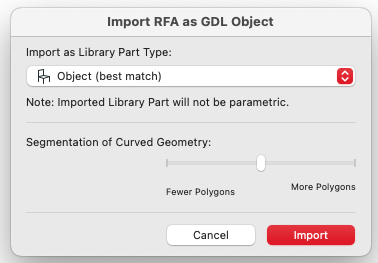
- When importing select the best object type for the RFA file and change “Segmentation of Curved Geometry” to medium (See below)
- SketchUp File Types
- SketchUp files can be easily imported but also can not be manipulated after importing